Crazy Farmer Launcher
- 4.7
- Rating
- 1.00M
- Installs
- Free
- Price

 Analysis by App-foxy
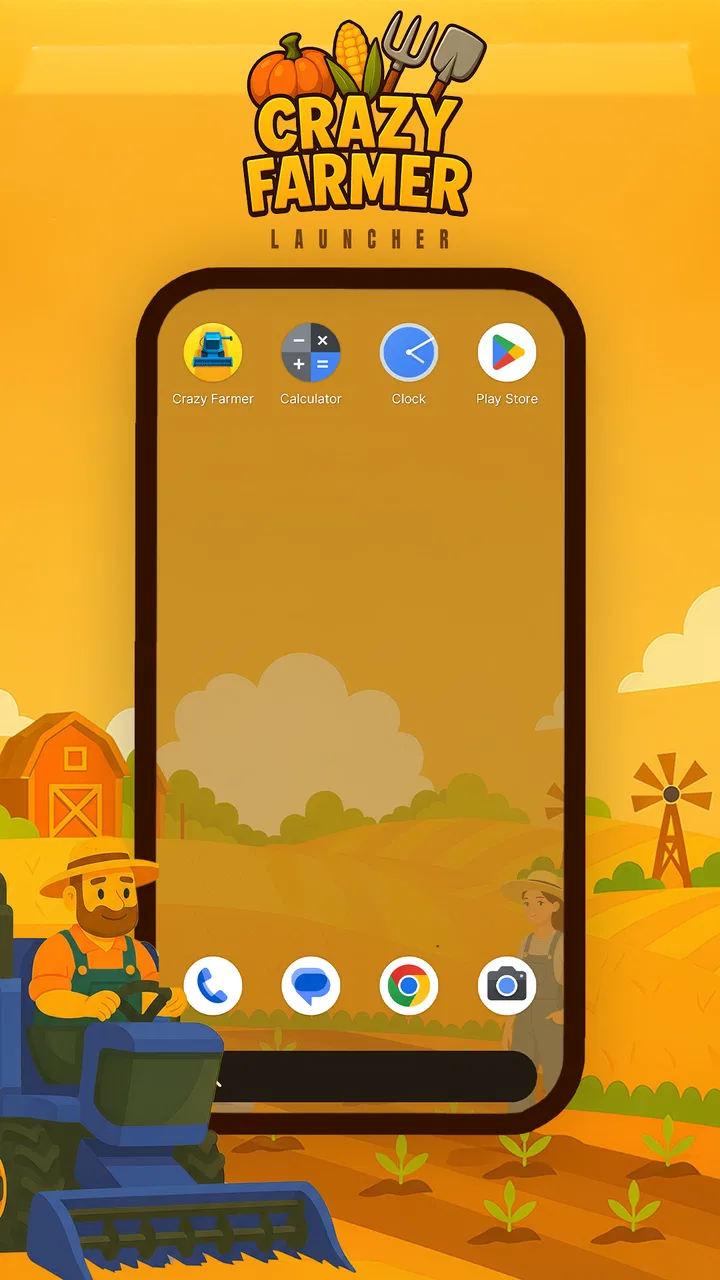
Crazy Farmer Launcher caught my attention because it treats personalization as something more playful than simply choosing a static wallpaper or rearranging icons. Developed by Gamnest, this free Android app places a farming theme at the center of the experience, giving the phone a more distinctive visual identity without asking me to learn a complicated customization system. After spending time with it, I see the main appeal clearly: it is easy to try, cheerful in tone, and aimed at people who want their device to feel less ordinary.
The important question, though, is not whether the farming idea is charming during the first few days. Most launchers can feel fresh at the beginning. The better test is whether the design remains comfortable after the novelty fades, whether daily maintenance becomes annoying, and whether the app offers enough recurring value to justify keeping it installed. My impression is positive but selective. This is a good fit for someone who enjoys themed personalization and wants a quick visual change. It is less convincing for someone who values a highly restrained interface, deep productivity controls, or a launcher that disappears completely into the background.
From first impression to everyday habit
The first-week appeal comes from the immediate change in atmosphere. A conventional home screen can become invisible after months of use, while a themed launcher gives familiar actions a different mood. Opening the phone, moving between screens, and checking the app layout feel more intentional when the visual language has a consistent farming character. That change is small, but it is exactly the kind of small change that makes personalization enjoyable.
You May Also Like

 Blood Strike: 2.5 Anniversary
Blood Strike’s Loadouts Turn Every Drop Into a Tactical Gamble
A close look at Blood Strike’s custom loadouts: how fast access to signature weapons reshapes its battle royale rhythm, rewards preparation, and narrows the gap between fights.

 Pandora - Music & Podcasts
Pandora’s Music Is Easy to Start, but Harder to Recover
Pandora’s strength is its low-effort path from a seed to a station. Its weak spot is how much confidence it asks you to place in connection, setup, and quiet recovery.

 8 Ball Pool
 Is Built on Rivalries, Rematches, and Routine
A close look at the rivalries, rematches, shared routines, and unanswered safety questions that turn a quick pool match into a persistent mobile community.

 Samsung Music
’s Quiet Strength Is Playing What You Already Own
Its reach comes less from spectacle than from dependable access to a personal library. That simplicity is both the app’s strongest retention engine and its ceiling.

 AccuWeather: Weather Radar
AccuWeather Review: A Quick, Clear Forecast for Everyday Decisions
For everyday plans, the best forecast is the one you can understand quickly. AccuWeather makes rain timing, radar, and local conditions easy to act on, with a few trade-offs.

 Hill Climb Racing
Why Hill Climb Racing Still Turns Crashes Into One More Run
A tiny car, a bumpy hill and one more upgrade: Hill Climb Racing keeps resurfacing because its simple chaos makes every near-miss feel personal.
More From Our News Desk



I also like that the concept is easy to understand. You do not need to be an enthusiast who spends an afternoon comparing icon packs, widgets, and launcher settings. The app’s identity is obvious from the beginning, and that reduces the decision fatigue common with broader customization tools. Instead of asking what style to build from scratch, it offers a clear direction. For a family tablet, a secondary phone, or a device used by someone who wants a friendlier look, that simplicity can be more useful than endless choice.
Its store summary promises an experience built around expanding fields and increasing profits, while the short description identifies it as Crazy Farmer. I would treat that language as part of the app’s playful theme rather than as a reason to expect a serious farming simulation. The appeal is the combination of a farmer-inspired presentation and launcher personalization, not a complex economic game. That distinction matters because people looking for detailed crop management or a full strategy title may be disappointed if they approach it with the wrong expectations.
During the first few days, I would recommend setting up only the screens you actually use. Put communication tools and daily essentials where your thumb naturally reaches them, then keep less frequent apps on a separate page. This sounds basic, but themed launchers can tempt users to prioritize appearance over speed. The best result comes from treating the farm styling as a layer over a practical layout rather than allowing decoration to dictate every decision.
A realistic everyday scenario is a personal phone used for messaging, music, shopping, and work-related tools. In that situation, the launcher can make the device feel more personal when you pick it up after a long day. It is also a reasonable choice for someone who changes phone themes with the seasons or who enjoys matching the visual style of a device to a current hobby. The key is that the app adds atmosphere without requiring a full redesign every time you want a change.
What makes the first week enjoyable
The strongest early benefit is coherence. A random collection of wallpapers and icons can look acceptable, but a focused theme usually feels more deliberate. Crazy Farmer Launcher has a clear personality, and that helps the home screen feel like a complete setting instead of a collection of unrelated choices. I found that especially useful on a spare device, where a strong theme can give the phone a purpose and character that a neutral layout lacks.
Another advantage is the low financial barrier. The app is free, so trying it does not require committing money to a style that may lose its appeal. That makes experimentation easier: you can use it for a few days, decide whether the visual language suits you, and return to your previous setup if it does not. The Everyone content rating also makes it suitable for a broad audience, including households where a playful interface is preferable to something more serious.
Still, free does not automatically mean frictionless. A launcher becomes part of the phone’s daily navigation, so even minor inconsistencies can become noticeable. I would pay attention to whether the home screen feels as quick as the default launcher, whether your usual gestures remain comfortable, and whether your app organization still makes sense after the theme is applied. A beautiful first impression is not enough if finding a frequently used app takes longer.
Where the novelty starts to weaken
The farming concept is also the main source of possible fatigue. A strong theme can be delightful when you are in the mood for it, but it may feel visually busy after repeated exposure. Users who prefer neutral colors, minimal icons, or a professional-looking home screen may find the personality too persistent. This is not a defect in the concept; it is a matter of how much visual character you want from a tool you may open dozens of times a day.
I would be cautious about installing it on a work phone if your workplace expects a restrained appearance. A playful home screen can be perfectly fine for personal use but less appropriate when you regularly share your screen, hand the phone to clients, or need a distraction-free layout. In those cases, the default launcher or a minimalist alternative is likely the better choice.
There is also a practical trade-off between themed presentation and long-term consistency. Android updates, changing app habits, and new shortcuts can gradually make any custom launcher feel less tidy. The more you rely on a themed arrangement, the more often you may need to revisit the layout. That is why I would avoid over-customizing every page at the start. A simpler setup ages more gracefully and is easier to restore if you decide to switch back.
Does it earn a permanent place?
I use this section to weigh whether the launcher’s visual character keeps adding something once the first impression wears off. A practical test is to notice whether I can reach my everyday apps just as comfortably on a busy morning as during a leisurely setup session; that separates a charming theme from a genuinely workable routine. With that in mind, the next question is how well it fits different people and situations.
Month-to-month value depends on your reason for installing it
After the initial excitement, the app’s recurring value comes from how much you enjoy seeing a themed interface every day. It is not the kind of utility I would expect to improve battery life, organize tasks, or replace a dedicated productivity system. Its job is more personal: it changes the feeling of using the phone. If that emotional benefit matters to you, the launcher can remain worthwhile even when you no longer notice every visual detail.
For me, the strongest long-term use case is a device that benefits from a recognizable identity. A shared household phone, a child-friendly personal device, or an older phone kept for casual use can feel less bland with a clear theme. The launcher can also work well for people who like rotating between a few distinct styles rather than searching for one permanent design. In that role, it becomes part of a cycle of refreshing the phone, not a tool that must deliver new functionality every week.
On a primary work device, the calculation is different. If you rarely change your wallpaper, do not care about themed icons, and mainly want instant access to a small set of apps, the launcher may not provide enough ongoing benefit. The default interface is usually better at being predictable. A focused minimalist launcher may also be preferable because it reduces visual stimulation and keeps attention on the task rather than the theme.
One useful habit is to separate visual refreshes from functional rearrangements. When you change both at once, it becomes difficult to tell whether you enjoy the theme or simply enjoy having a newly organized phone. I would first use the launcher with a familiar app arrangement for several days. If the design still feels pleasant after the setup excitement has passed, then adjust the layout gradually. This gives you a clearer sense of whether the app is earning its place.
The maintenance burden is manageable, but not invisible
Every launcher adds a small layer of responsibility because it becomes the front door to the device. New apps need a place, old apps need removing, and shortcuts may need occasional attention. Crazy Farmer Launcher is easiest to live with when you keep the home screen restrained. A crowded layout works against the calm, playful effect and makes the theme look more like a decorated storage shelf than a coherent environment.
I would keep only the apps used every day on the main screen and place occasional tools elsewhere. That approach has two benefits: it preserves the visual impact of the theme, and it limits the amount of rearranging required when your habits change. It also makes it easier to evaluate the launcher honestly. If the home screen contains too many icons, any launcher can feel cluttered, and the problem may be your organization rather than the app itself.
Maintenance also includes checking how the launcher fits your normal navigation habits. Some people depend heavily on search, gestures, folders, or a familiar app drawer. If your routine relies on those behaviors, test them early rather than waiting until the theme has become part of your daily muscle memory. A launcher is not successful if it looks good but forces you to fight the phone each time you need a simple tool.
The current release is version 1.0.4, and I would keep expectations realistic when judging a relatively young customization product. The app was released on October 19, 2025, so its long-term place in a changing Android ecosystem will depend on how comfortably it continues to fit newer devices and user habits. I would not install it and forget it immediately; I would check after a few weeks whether the experience remains stable and convenient for the way I actually use my phone.
Small sources of fatigue that matter over time
The largest fatigue risk is repetition. A theme that feels amusing on day one can become background decoration by the end of the month. That is normal, but it means the app needs to provide either lasting comfort or an easy reason to revisit it. If the only pleasure comes from the initial reveal, the launcher may be better treated as a temporary makeover than as a permanent replacement.
Another risk is visual mismatch. Your favorite apps may not share the same style as the launcher, and the contrast can become more noticeable as you add new tools. This is where a highly themed interface can lose some of its polish. Rather than trying to force every app into the same visual world, I would accept a little contrast and focus on keeping the most visible parts of the home screen tidy.
There can also be fatigue from switching back and forth. If you frequently compare the custom launcher with the default one, you may spend more time managing your interface than enjoying it. I recommend giving Crazy Farmer Launcher a fair trial with a stable layout, then making one clear decision. Keep it if the themed experience makes the phone more pleasant; remove it if you repeatedly find yourself missing the simpler default environment.
People who need extensive accessibility customization should be especially careful. A playful appearance is not a substitute for readable sizing, strong contrast, predictable navigation, or the accessibility tools built into the operating system. If those needs are central to your phone use, test comfort before appearance. The best launcher is the one that lets you operate the device confidently, even if it looks less distinctive.
Who should install it, and who should skip it?
I would recommend it to users who want a free, characterful change to their Android home screen, especially those who enjoy farming themes or prefer a clear visual concept over a blank canvas. It is also a good experiment for someone with an older secondary device that feels dull and could benefit from a new identity. Since it is rated for Everyone, it can suit a wide range of personal and household contexts.
I would skip it if your priority is maximum efficiency, a nearly invisible interface, or deep control over every individual element. In those situations, the default launcher may be more dependable, while a minimalist or productivity-focused alternative may better match your goals. I would also avoid making it the centerpiece of a professional setup unless the playful design genuinely fits your environment.
The app has attracted a 4.7 average from around 4.1 thousand ratings and has passed one million installs, which suggests that the concept has found a substantial audience. Those figures are encouraging, but they do not replace personal testing. Launcher preferences are unusually subjective: a design that makes one person smile can make another person feel distracted. I would use the positive reception as a reason to try it, not as proof that it will suit every phone.
My final view is that Crazy Farmer Launcher earns lasting space when you value mood and identity as part of using your phone. It makes the most sense as a friendly visual transformation, not as a replacement for every productivity or accessibility feature in the operating system. The app is free, easy to sample, and distinctive enough to stand apart from a generic wallpaper change.
Its long-term success depends on discipline. Keep the layout simple, protect quick access to your daily apps, and be honest when the farming style stops feeling enjoyable. If you do that, the launcher can remain a pleasant background companion instead of becoming another customization project to maintain. For me, that is the fair recommendation: try it when you want a cheerful Android refresh, keep it if the character still feels comfortable after the first-week excitement, and choose a quieter alternative when speed and restraint matter more than personality.
FAQs for Crazy Farmer Launcher
01What is Crazy Farmer Launcher, and what does it do?
Crazy Farmer Launcher is a unique mobile application designed to enhance your farming simulation experience. It offers an immersive interface with customizable widgets, themed notifications, and interactive tools to manage your virtual farm efficiently. The app seamlessly integrates with popular farming games, providing users with exclusive content and in-game bonuses.
02Is Crazy Farmer Launcher available on both Android and iOS?
Yes, Crazy Farmer Launcher is available for download on both Android and iOS platforms. The app is optimized for a wide range of devices, ensuring smooth performance and compatibility. Users can easily find it on the Google Play Store and the Apple App Store, with regular updates to support the latest OS versions.
03Does Crazy Farmer Launcher offer in-app purchases?
While Crazy Farmer Launcher is free to download, it does offer in-app purchases. These purchases unlock premium features such as exclusive farm themes, advanced widgets, and additional customization options. Users can choose to enhance their experience with these optional purchases, though the app remains fully functional without them.
04How does Crazy Farmer Launcher enhance the gameplay of farming simulation games?
Crazy Farmer Launcher enhances gameplay by providing a customizable interface that integrates directly with your favorite farming simulation games. It offers real-time notifications, weather forecasts, and crop management tools. These features help users optimize their farming strategies, leading to more efficient and enjoyable gameplay sessions.
05Is Crazy Farmer Launcher safe to use on my device?
Yes, Crazy Farmer Launcher is safe to use. The app is developed by a reputable company with a focus on user privacy and data security. It undergoes regular security audits and complies with industry standards to ensure that your personal information remains protected while using the app.
Pros
- Intuitive and user-friendly interface.
- Wide variety of customization options.
- Low resource consumption on devices.
- Regular updates with new features.
- Compatible with both Android and iOS.
Cons
- Contains in-app advertisements.
- Some features require a premium upgrade.
- Occasional bugs in certain themes.
- Limited support for older devices.
- Customization can be overwhelming for beginners.

Crazy Farmer Launcher
Gallery